Getting the right image for a landing page or article usually means opening an image tool, writing a prompt, iterating until it looks good, then downloading and uploading into your project. It’s tedious — and the result still has to fit the page.
PhotoBuilder turns that on its head. The AI analyzes your page and generates image prompts for you. Photos that match your content and tone, with a single click.
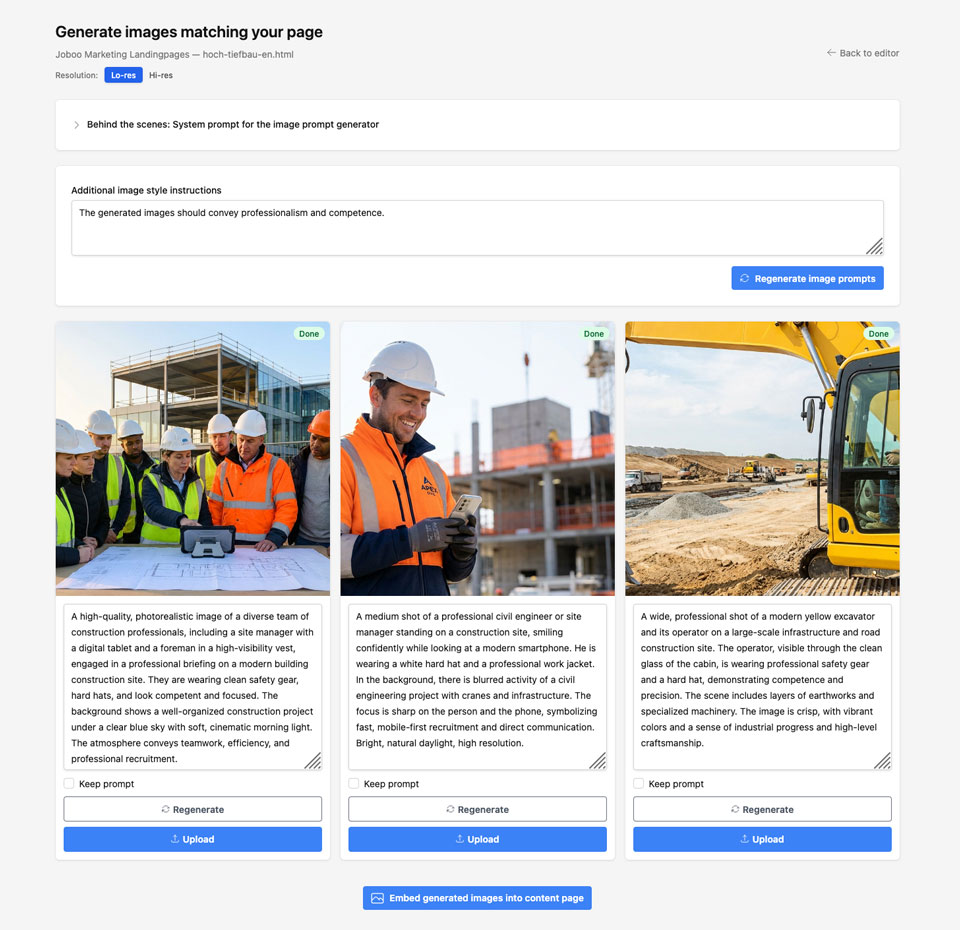
How It Works
When you’re in the content editor and have a built page (for example a landing page you just created with the chat), you’ll see a camera icon next to the page in the dist files list. Click it to open PhotoBuilder.
From there:
- Page analysis — The AI reads your page’s HTML and context. It understands the topic, tone, and structure.
- Automatic prompts — It suggests image prompts that fit. No guessing, no trial and error. You get prompts tailored to your page.
- Review or edit — You can use the suggestions as-is or tweak them. Then trigger generation.
- Generate — Images are created via OpenAI (gpt-image-1) or Google Gemini (gemini-3-pro-image-preview). You can choose your provider in project settings.
- Upload and embed — Generated images upload to your S3 media store. One click embeds them back into the page via a prefilled chat message. You never leave the editor.
The real value isn’t “another AI image tool.” It’s that you don’t have to prompt your way to a good photo. Page analysis and automatic prompt generation mean images that fit your page perfectly, with minimal effort.
Optional Dedicated Key and Locale
You can use the same LLM key as content editing, or set a dedicated API key for image generation (for example a different provider or budget). Prompts are locale-aware — if your app is in German, prompt generation follows that language so generated images align with your content.
Regeneration is supported: keep your prompt and regenerate for a new variant, or change the prompt and generate again.
Try It
PhotoBuilder is available in the content editor for any project with a built output. Open a conversation, build a page, then use the camera icon next to the built file to start. No extra setup beyond your existing project and (optionally) a dedicated image-generation key.